Updated September 4, 2026
⚡ Quick Summary
Tesla built a wireless charging pad into the console, but it sits low behind your elbow where you can’t see the phone. That’s why people buy a Tesla phone mount. It isn’t about charging, it’s about where the phone sits. There’s also a catch most guides skip: Tesla’s owner’s manual warns that charging your phone on the factory pad with an NFC card behind it (your key card, a credit card, a stick-on card wallet) can damage the card.
Decide one thing first: charging or hold-only. A charging mount costs more and adds a cable, but the phone never goes near the console pad again, so that NFC problem goes away. A hold-only mount is cheaper and simpler, and means you’re still using the pad. Then pick how it attaches: the VICSEED hides behind the screen on 3M adhesive and is our top hold-only pick; the UGREEN clamps the screen edge with no adhesive, but its own listing rules out the Juniper Model Y and screen protectors. For a charging mount we’re not naming a pick at all this year, and the reason is in its own section below. I’ve run a charging edge-clamp on my own Model Y for fourteen months — it worked loose and I taped it, which is a story worth reading before you buy that style.
On the organizer side, the console was re-molded for Highland and Juniper, so the most common buying mistake in the category is ordering the right product for the wrong generation.
Disclosure: As an Amazon Associate, I earn from qualifying purchases. This comes at no extra cost to you and helps keep this site running.
Why a Tesla phone mount is a different problem than in any other car
In most cars, a phone mount solves a missing-feature problem: there’s nowhere good to put the phone. A Tesla phone mount is solving something more specific than that. There is somewhere to put the phone — Tesla built a charging pad into the console. It’s just flat, low, and behind your right elbow.
We run three Teslas (a 2021 Model 3, a 2023 Model Y, and a 2024 Model Y) and exactly one of them has a phone mount on it: the 2023 Model Y, a charging mount that’s been clamped to the top-left edge of the touchscreen since June 2025. One out of three is a fair summary of where I’ve landed on this category: useful, not essential. After fourteen months with one I’ve also got opinions about what you’re committing to when you attach something to a screen. Mine worked loose, and I’ll get to that.
Tesla’s own documentation is clear about what the pad is. From the Model Y owner’s manual:
“Wireless phone chargers are integrated into the front console, providing up to 15W of power to charge Qi-enabled phones. To charge your phone, place it on one of the two charge pads.”
The 2017–2023 Model 3 manual describes a single pad and hedges harder, “A wireless phone charger (if equipped), is integrated into the front console,” which is the polite way of saying early Model 3s may not have one at all.
So charging is handled, or close enough. What isn’t handled is seeing the phone. If you use your phone for something the car’s screen doesn’t do (a second navigation app, a rideshare queue, a work call with the caller ID visible), the console pad puts it in the worst possible place for a glance. That is the actual job a Tesla phone mount is buying you, and it’s worth being honest that it’s a convenience, not a fix for a defect. Plenty of owners genuinely don’t need one. If you’re not using the phone for something the car can’t do, skip the category and put the money toward something that protects the car, which is the argument we made at length in Tesla accessories that are a waste of money.
The NFC-card warning in Tesla’s manual
This is the part of the category that gets ignored, and it’s printed in Tesla’s own CAUTION box — identically in both the Model Y and the 2017–2023 Model 3 manuals:
“Before you charge, remove any objects (coins, keys, metal objects, etc.) between the phone and charger, as well as any NFC cards (for example, the vehicle key card, credit cards, or hotel key) placed on or behind the phone (like with integrated phone cases). Damage to NFC cards can occur when you charge the phone without first removing the card.“
Now think about how Tesla owners actually use their phones. Stick-on card wallets are common, and Tesla owners have a specific reason to use one: the key card is the backup that gets you into the car when your phone key doesn’t cooperate. So the natural move is: key card into the stick-on wallet, wallet onto the back of the phone, phone onto the console pad. That’s exactly the setup Tesla says not to use.
There’s a second, less alarming version of the same collision. Both manuals note the pad is fussy about what’s between it and the phone:
“The wireless phone charger may not work if your phone case is too thick or is made of metal.”
The 2017–2023 Model 3 manual words it “too large or is made of metal.” Either way: if your phone isn’t MagSafe-native and you stick one of the included metal adhesion rings on the back so a magnetic mount will hold it, you may have just degraded the factory pad you were still planning to use.
A mount sidesteps both problems, because a magnetic mount holds the phone by the magnet ring and never asks you to lay it on an induction coil. That is a genuinely good reason to own one that has nothing to do with convenience, and it’s the reason I’d rather see a card wallet paired with a mount than with the pad. If you want the card wallet, this three-pack is the one we card in our locked-out-of-your-Tesla guide — just don’t set it down on the charging pad.
How to choose a Tesla phone mount: three mechanisms, three tradeoffs
Almost every Tesla-specific mount on Amazon uses one of three attachment methods, and the listings are not shy about their limits once you read past the title. This is where the buying mistakes happen.
First decision: does it charge, or does it just hold the phone?
This is the first decision, and most roundups skip it. There are two kinds of Tesla phone mount:
- Hold-only. A magnet and an arm. Cheaper, lighter, no cable. Your phone is visible but it is not charging — so you’re still going to use the console pad, which means everything in the NFC-card section above still applies to you.
- Charging. The mount has a Qi or Qi2 coil in it and runs a cable to a console USB port. More expensive and there’s a wire to route, but the phone charges where you can see it — and you may never put the phone on the factory pad again, which makes the key-card trap disappear entirely.
That second point matters more than it sounds. If the reason you’re reading this is that you stick your key card to the back of your phone, a charging mount doesn’t just add convenience — it removes the failure mode Tesla warns about, because the phone stops going anywhere near the console pad.
Second decision: how does it attach?
1. Adhesive behind the screen. The mount sticks to the back edge of the touchscreen with 3M tape and folds away when you don’t need it. Nothing touches the display face, so screen protectors are irrelevant, and the arm hides when folded. The tradeoff is permanence — you’re committing adhesive to the back of the screen housing, and it wants a proper cure before you hang a phone on it.
2. Clamp on the screen edge. A bracket grips the display’s edge (a single corner on some designs, all four on others) and locks in place. No adhesive, so it comes off clean, which matters if you lease. Two tradeoffs, and the second one bit me personally. First, clamping the edge makes the thickness of that edge a fitment spec: add a glass screen protector and the clamp may not close. Second, it is holding onto a genuinely small amount of screen edge, and whether it stays put over the long haul is a real question. I’ve run one for fourteen months and can tell you it’s a fair question — see the next section.
3. Adhesive on the screen face. The mount adheres to the front of the display, usually with a charging puck. The tradeoff is that it’s living on the screen face, so screen protectors become a real compatibility question, and it needs a cable run.
Notice how often “screen protector” shows up in that list. That’s not a coincidence, and it connects to something we’ve already published: after looking at Tesla’s own cleaning guidance and our three cars’ screens, our conclusion in Do you actually need a Tesla screen protector? was that most owners don’t. If you’re mounting a phone to the screen, that answer gets easier — the mount and the protector are competing for the same surface.
What I actually run — and the part that failed
Before the picks, here’s the mount that’s on my own car, because it isn’t the one I’d hand a new buyer and I’d rather explain that than hide it.
CloudValley 15W Wireless Charging Mount
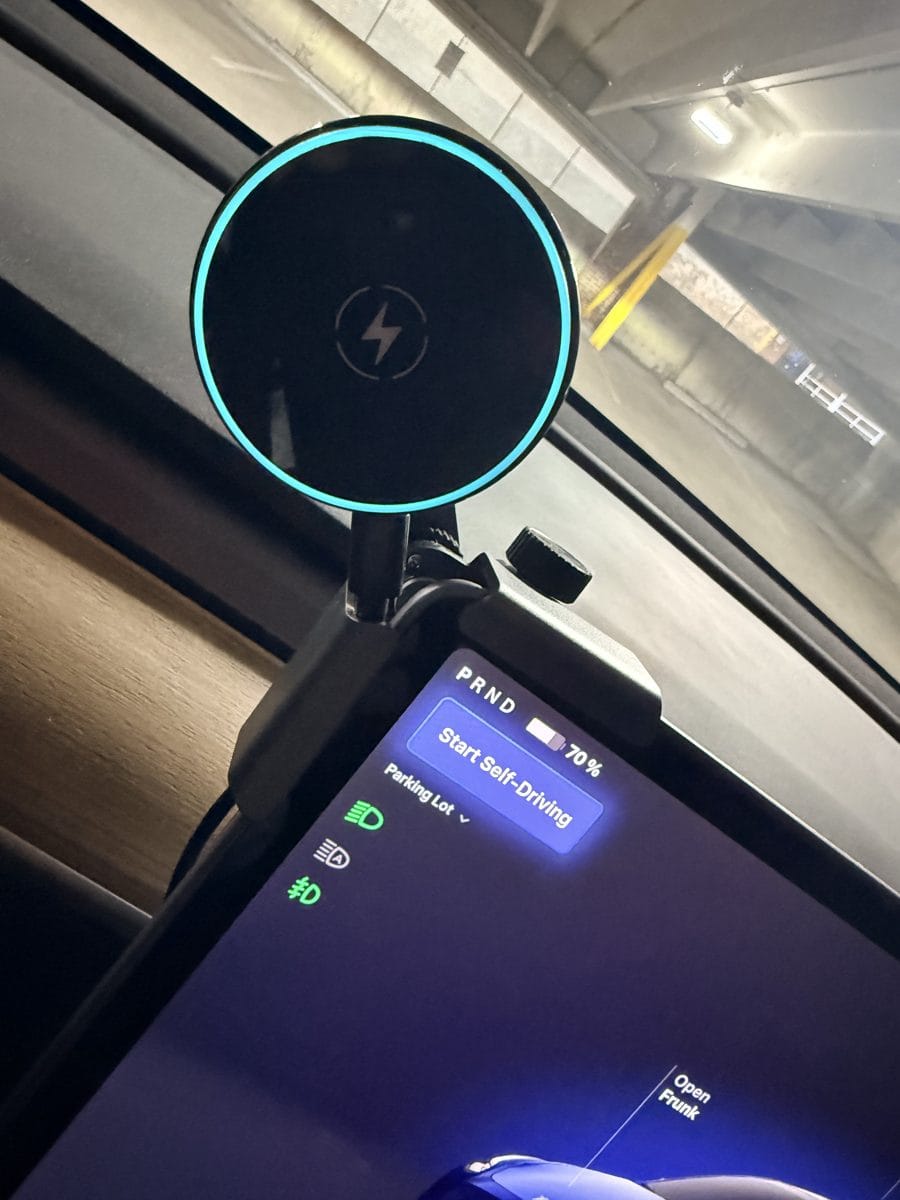
This has been clamped to the top-left edge of our 2023 Model Y’s screen since June 21, 2025 — fourteen months at the time of writing. A charging edge-clamp. I’m putting it in its own box rather than in the picks below, and the reason is in the last paragraph.
What I like about it, honestly: it charges fast, and that’s the thing I’d miss if it were gone. And the position is genuinely good. The phone sits where I can glance at it and get my eyes straight back on the road, which is the entire reason to own one of these instead of leaving the phone in the console. To answer the question I’d want answered before buying: at that top-left position, it doesn’t block anything on the screen. Not the driving readout, not the map. That’s not a small thing — plenty of mounts in this category are marketed specifically against blocking your speedometer, so it’s a real risk elsewhere and a non-issue here.
What went wrong: it didn’t stay attached. The mount grips a very small amount of screen edge, and somewhere in those fourteen months that stopped being enough. I fixed it with double-sided tape, and that solved it — but I want to be blunt about what that means: the listing sells this as “no adhesives needed,” and I ended up adding adhesive to keep it on the car. CloudValley isn’t entirely silent on this either. Its own installation bullet tells you to “check its firmness periodically after installation and re-secure if needed.”
So why isn’t it a pick? Because one person’s workaround isn’t a recommendation. I’m clearly not the only buyer who’s hit this — CloudValley’s own instructions tell you to re-check the mount’s firmness over time, which tells you they’ve heard about it. The charging is great. The sightline is great. The holding on, over a year and change, is not. Mine is still on the car because I’ve already taped it. I’m not going to tell you to buy it and then hope you own double-sided tape.
Fitment per the listing: Model 3/Y including Model 3 Highland 2024 and Model Y Juniper 2025. For non-Tesla vehicles it specifies a screen edge between 5–17mm.
That’s the honest version of “long-term ownership”: one mount on one car, and it worked loose once. Everything below is the fitment and specification work — verified against the live listings, not lived with.
VICSEED Tesla Phone Mount — Foldable, Hidden, Screen-Back Adhesive
Best for: most owners, and the only one of the three that ignores the screen-protector question entirely.
Fitment per the listing: Tesla Model 3, Model Y, Juniper, and Cybertruck (the listing names generations, not model years), one of the few mounts that doesn’t force you to figure out which generation you own.
It installs on the back of the touchscreen and folds flat when you’re not using it, so nothing sits in your sightline or over the speedometer readout. The magnet array is 12 N52 magnets, so it holds MagSafe iPhones and official MagSafe cases directly; two metal rings are in the box for phones and cases without MagSafe. A 360° ball joint handles portrait or landscape.
Two things from the listing worth knowing before you commit the adhesive. VICSEED rates the 3M tape from -40°F to 194°F — relevant if your car bakes in a driveway. And the install is a “do it once” job: the listing says to use the alignment frame, press for three minutes, then let the adhesive cure six hours before hanging a phone on it. Do that on a night you don’t need the car.
Note: if you use one of the included metal rings on a non-MagSafe phone, re-read the section above — the factory console pad may stop working well with that phone.
UGREEN Tesla Phone Mount — Corner Clamp, Comes Off Clean
Best for: leased cars, and anyone who doesn’t want 3M tape anywhere near the display.
⚠️ Fitment per the listing — read this one carefully: “Specifically designed for Tesla Model 3 & Model Y, not compatible with … Model Y Juniper … Cybertruck,” among other vehicles it names. If you have a 2025 or 2026 Model Y, this is not your mount. The listing also states the screen clamping thickness must be ≤11mm with square corners, and that use with a screen protector applied is not recommended.
Within those limits it’s the cleanest install in the category: an adjustable knob clamps the corners of the console screen, a one-click lock holds it, and a triangular support structure keeps it from wobbling. Ring of N52 magnets, 360° ball joint for portrait or landscape. It comes off without residue whenever you want it gone.
Note: no wireless charging function — the listing says so outright. This holds the phone, nothing else.
We’re not naming a charging mount, and that’s the finding
Every other slot in this guide has a pick. This one doesn’t, and I’d rather explain why than recommend the least-bad option.
Charging mounts attach one of two ways, and I couldn’t recommend either kind right now:
The screen-clamp designs grip the edge of your touchscreen. That’s the same mechanism I’ve run for fourteen months — and mine worked its way loose, exactly as described above. The clamp mounts I looked at use the same kind of grip. I’m not going to recommend a mechanism I already know failed on my own car and then act surprised when it does it on yours.
The adhesive designs are the ones engineered around the problem, the same logic that makes the VICSEED our hold-only pick. But the adhesive charging mounts I looked at won’t state whether they fit a Juniper Model Y or a Highland Model 3. Not “they don’t fit” — they simply don’t say, and I’m not guessing about fitment on a part that clamps onto your touchscreen. The one option that did publish a full, current-generation fitment list I wasn’t comfortable recommending on what I read about how it holds up.
So if you want 15 watts at eye level today, know what you’re getting into. Expect to check the mount at the one-month mark, and expect that you may end up adding double-sided tape the way I did. That’s not the answer I wanted to give, but it’s the honest one. This category will get better, and when it does, this section gets a pick.
If you want the corner-clamp mechanism but the UGREEN’s exclusions rule you out, Lamicall’s version uses the same four-corner lock with an N55 magnet ring — verify its fitment list against your car before you buy, because the exclusions in this mechanism are product-specific, not universal.
Console organizers: which generation your console is
Organizers sell well because the Tesla center console is one big empty bin. Tesla’s Model Y manual describes it as cup holders, two storage compartments, chargers, and, notably, “an RFID transmitter that reads key cards.” One big undivided bin with a card reader in it. Everything you drop in slides to the back and rattles. The photo at the top of this article is one of ours on an ordinary day. It’s also why our 2023 Model Y has had an aftermarket drawer organizer in it since delivery day.
The organizer market exists to add the dividers Tesla left out. And it is a minefield for exactly one reason: the console was re-molded. A tray cut for a 2022 Model Y does not fit a 2025 Juniper, and the listings themselves say so — the legacy tray we card on the Model 3 guide states flatly that it “does not fit for Tesla Model 3 2024 and 2025 Tesla Model Y Juniper.”
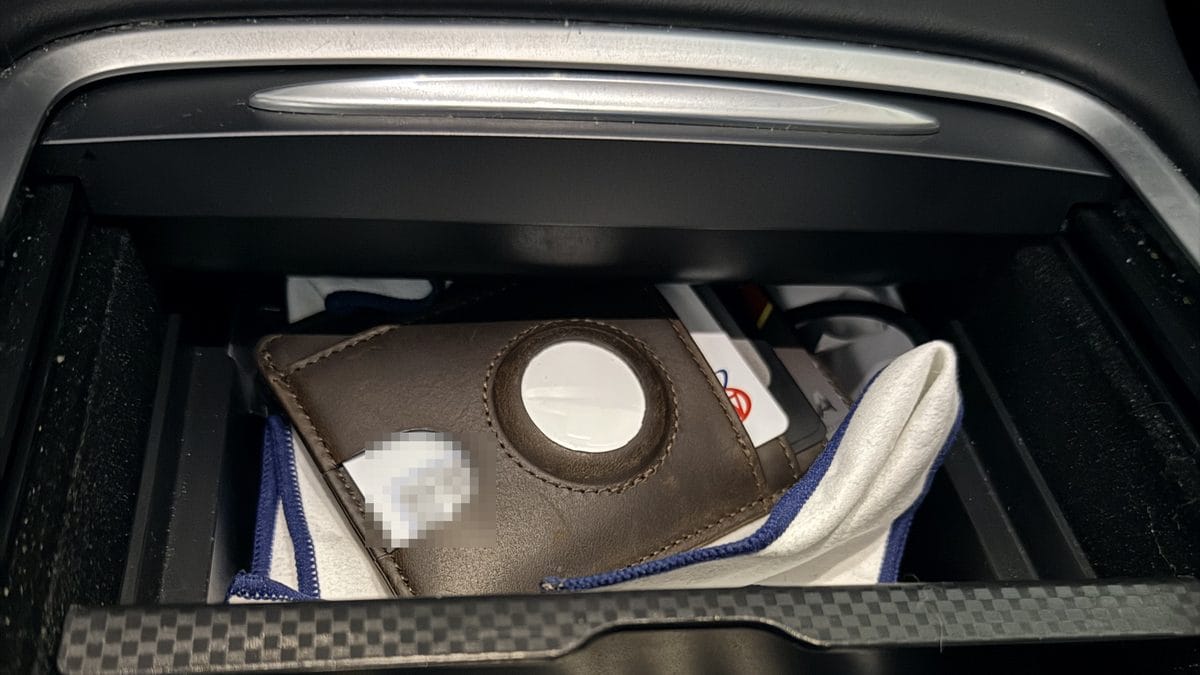
So before you add anything to a cart, sort yourself into a lane:
- Legacy — Model Y 2021–2024, Model 3 2021–2023
- Highland / Juniper — Model 3 2024–2026, Model Y 2025–2026
- Pre-2021 Model 3 — a different console again; make sure the listing names 2017–2020 specifically
That three-way split is the same one we mapped across every category in the Model Y accessory directory, and it’s the single most useful thing to get right before spending money.
Wigoo Console Organizer Set (4-Piece)
Best for: 2025–2026 Model Y Premium and Performance owners, and every 2024–2026 Model 3 Highland trim.
Fitment per the listing: Tesla Model Y Juniper and Model Y L, Premium & Performance only (2025/2026), and Model 3 Highland Standard, Premium & Performance (2024–2026). The listing doesn’t claim the Model Y Standard, so I’m not claiming it either; see the note below.
Four pieces that partition the console and armrest into fixed compartments instead of one open bin, with a liquid-silicone lining so the contents stop rattling. The listing names the exact trims it fits, which matters more here than usual: the console was re-molded, and a listing that commits to trims is your evidence the fit is real.
Model Y Standard owners: the only tray I could find that explicitly claims to fit the Standard trim is Tesnical’s full-enclosure tray — but I have no fitment evidence beyond its own title, so treat it as a lead to check rather than a recommendation.
BASENOR Center Console Organizer Tray
Best for: the 2021–2024 Model Y / 2021–2023 Model 3 owner who wants the cheapest fix that actually works.
Fitment per the listing: 2021–2024 Tesla Model Y and 2021–2023 Model 3. Note the two ranges are different — the Model 3 range stops a year earlier, because Highland arrived first.
Double-layer design with divided compartments, so small items get their own homes instead of migrating to the back of the bin. Carbon-fiber edge accents. BASENOR specifically calls out the material choice against silicone — silicone trays attract dust and are miserable to clean, and this one wipes down with a damp cloth.
If you’d rather have the three-piece treatment (console tray, armrest tray, and a hidden armrest box), the Carwiner 3-piece set covers the same 2021–2023 Model 3 / 2021–2024 Model Y lane.
Motrobe Cup Holder Insert
Best for: anyone whose cup rattles, tips, or swims in an oversized holder.
Fitment per the listing: Model Y Juniper 2025–2026 (Standard, Premium, Performance), Model Y L 2026 (Premium, 6-seat interior), and Model 3 Highland 2024–2026.
Tesla’s cup holders are generously sized, which is great for a Trenta and useless for a 12-ounce can. This drops in with a 2.76-inch inner base and internal grip strips so 12- and 16-ounce containers stop rattling on turns. Reinforced high-density silicone that resists collapsing, in a matte finish that reads as factory rather than aftermarket.
Legacy cars: the equivalent is Spigen’s insert for the legacy Model Y & 3, which the listing rates for cups up to Trenta.
Quick comparison
| Product | Charges? | Attachment | Fits (per listing) | Best for | Tier |
|---|---|---|---|---|---|
| VICSEED phone mount | No | 3M adhesive, screen back | Model 3, Model Y, Juniper, Cybertruck | Most owners; ignores screen protectors | Mid |
| UGREEN phone mount | No | Edge clamp, no adhesive | Model 3 & Model Y — not Juniper, not Cybertruck; no screen protector | Leases; removable install | Budget |
| (no charging pick) | — | — | — | See “we’re not naming a charging mount” above | — |
| CloudValley (what I run) | Yes, 15W | Edge clamp | Model 3/Y incl. Highland 2024, Juniper 2025 | Not a pick — see above | Mid |
| Wigoo console set | — | Drop-in | Model Y 2025–26 Juniper / Model Y L (Premium/Performance), Model 3 2024–26 Highland (all trims) | Newer cars | Mid |
| BASENOR console tray | — | Drop-in | Model Y 2021–24, Model 3 2021–23 | Legacy cars | Budget |
| Motrobe cup insert | — | Drop-in | Model Y Juniper 2025–26, Model Y L 2026, Model 3 Highland 2024–26 | Rattling cups | Budget |
Two free settings to change before you buy anything
Both of these are in the car already, and between them they solve a chunk of what people buy accessories to fix.
“Phone Left on Wireless Charger.” The 2017–2023 Model 3 manual documents a notification that tells you when you’ve walked away from the car with your phone still on the pad — enabled under Controls > Locks. If the reason you want a mount is that you keep forgetting your phone in the console, turn this on first and see whether the problem goes away for free. The manual also notes it still works even if you’ve disabled power to the pads.
Turning the pads off. Both manuals document disabling the wireless chargers under Controls > Charging > Wireless Phone Charging Pads. If you’ve moved to a mount and you’re worried about the NFC-card warning above, this removes the failure mode entirely rather than relying on remembering.
Frequently Asked Questions
Will a Tesla phone mount block the speedometer or the map?
It depends entirely on where it sits, and this is worth checking before you buy because several mounts in this category advertise specifically against blocking your display, which tells you it’s a real problem with some designs. A mount parked over the driving information is the one to avoid. For what it’s worth, the mount on my own 2023 Model Y clamps to the top-left edge and blocks nothing — not the driving readout, not the map. A screen-back mount like the VICSEED sidesteps the question entirely, since it holds the phone out past the edge of the display rather than over it.
Will a Tesla phone mount damage my touchscreen?
The honest answer is that it depends on the mechanism, and the risk is mostly to the finish, not the display. Adhesive mounts on the back of the screen housing use automotive 3M tape rated for wide temperature swings; VICSEED’s listing quotes -40°F to 194°F and says the adhesive removes without residue. Corner clamps touch the bezel and come off clean. Screen-clamped charging mounts grip the display edge itself, and the one on my own car is the one that worked loose over time (see above). If you’re worried, the corner clamp is the reversible option.
Does a mount stop the factory wireless charging pad from working?
Not by itself — but the metal ring can. Tesla’s manual says the wireless phone charger “may not work if your phone case is too thick or is made of metal.” Magnetic mounts include adhesive metal rings for phones without MagSafe, and once that ring is on the back of your phone, you’ve put metal between the phone and the coil. If you want to keep using the console pad with a non-MagSafe phone, either buy a MagSafe-compatible case or accept that the mount replaces the pad rather than supplementing it.
Which console organizer fits a 2025 or 2026 Model Y?
The Juniper-generation ones only. The console was re-molded, and the legacy trays say so on their own listings — the Carwiner set states it “does not fit for Tesla Model 3 2024 and 2025 Tesla Model Y Juniper.” For 2025–2026 Model Y and 2024–2026 Model 3, look for a listing that names Juniper or Highland explicitly, and ideally one that names your trim. We go generation-by-generation on this in the Model Y Juniper accessories guide.
Is it safe to keep my Tesla key card in a stick-on wallet on my phone?
Keeping it there is fine. Charging on the console pad with it there is not. Tesla’s manual is direct: remove “any NFC cards (for example, the vehicle key card, credit cards, or hotel key) placed on or behind the phone… Damage to NFC cards can occur when you charge the phone without first removing the card.” A replacement key card is a cheap fix but an annoying afternoon. If you run a card wallet, run a mount too and keep the phone off the pad.
Our Honest Verdict
Buy a mount if you actually use your phone while driving for something the car doesn’t do. If you don’t, the factory pad is genuinely fine and this is a category you can skip — we’d rather see the money go to paint and wheel protection.
If you’re buying, answer the charging question first — because it’s the question this guide can only half answer. Carry your key card on the back of your phone? Then a charging mount solves a failure mode Tesla actually documents, and it’s worth the money. But read the box above before you buy one: I couldn’t find a charging mount I’d put my name on, and I’d rather tell you that than sell you the least-bad one. Don’t need charging at the mount? Then you’re in luck, because that’s where the good options are. The VICSEED is the pick: widest fitment of anything here including Juniper and Cybertruck, folds out of sight, and because it lives behind the screen a screen protector doesn’t affect it. Just respect the six-hour cure.
And the thing I’d tell a friend, which is why the CloudValley sits in its own box above and not in this list: be careful with edge-clamp mounts specifically. Mine charges beautifully, blocks nothing on the screen, and sits exactly where I want it, and across fourteen months it still worked its way loose, because there just isn’t much screen edge to hold. I solved that with double-sided tape. But if you’re going to end up adding adhesive anyway, you may as well buy the design that was engineered around adhesive from the start. That’s the whole case for the VICSEED in one sentence.
On a lease, or unwilling to commit adhesive at all? The UGREEN corner clamp is the one that comes off clean — but only if you’re not on a Juniper Model Y and not running a screen protector, both of which its own listing rules out.
The organizers are the easier decision, and the better value. Sort yourself into legacy or Highland/Juniper first, then buy — the tray is a cheap fix for a daily annoyance, and unlike the mounts there’s no real downside case. And whatever you do with either category, take Tesla’s NFC warning seriously. It costs nothing to follow.