Updated September 4, 2026
⚡ Quick Summary
If you drive a Tesla, you already have a dash cam — it’s just a limited one. Tesla’s own owner’s manual tells you, in writing, not to rely on Dashcam to record every safety-critical event. My own night footage backs that up: a plate directly ahead of me at a stoplight was perfectly readable, but the same camera couldn’t hold a plate at highway speed or against oncoming headlights.
For most Tesla owners, a second camera is a want, not a need, until you park somewhere rough or need front-plate reads at speed. For non-Tesla EV drivers with no built-in system, it’s a straight buy. Our pick for the best dash cam for EV use in 2026 is the VIOFO A329S 2CH; the A229 Plus 2CH is the value play. Whichever you pick, plan the power before you plan the camera, because that is where EVs are different.
Disclosure: As an Amazon Associate, I earn from qualifying purchases. This comes at no extra cost to you and helps keep this site running.
Why I went looking for the best dash cam for EV use in the first place
I wanted to know whether the Dashcam and Sentry Mode built into a Tesla are enough, or whether a separate dash cam is worth adding. All three of our Teslas, a 2021 Model 3, a 2023 Model Y, and a 2024 Model Y, run Dashcam and Sentry Mode with a USB drive in the glovebox.
For most of the time I’ve owned them, I assumed that settled it. The car already records, so I saw no reason to put a second camera on the windshield.
Two things changed my mind.
The first is that Tesla itself is blunt about the limits, in the owner’s manual, in a box with a warning icon.
The second is that I looked closely at what my own car had recorded at night instead of assuming it was fine. What I found is below, and it lands somewhere between “TeslaCam is great” and “TeslaCam is useless.”
If you drive a non-Tesla EV, such as a Mach-E, an Ioniq 5, an EV6, or a Lightning, none of this applies to you, because you have no built-in system at all. Skip to the picks, but read the power section, because that is the part that gives EV owners the most trouble.
What Tesla’s own manual says about Dashcam and Sentry Mode
There is a lot of hyperbole in this category, so rather than characterize anything, this is what Tesla publishes in the Model Y owner’s manual, verbatim (the Dashcam and Sentry Mode pages):
On Dashcam’s automatic saving:
“Several factors determine whether Dashcam automatically saves a recording of a safety-critical event (for example, amount of force, whether or not airbags deploy, etc.). Do not rely on Dashcam to automatically record all safety-critical events.“
On Sentry Mode:
“Do not rely on Sentry Mode to protect Model Y from all possible security threats. Sentry Mode uses many factors to determine whether to activate the security alarm. All impacts may not be detected and the alarm may not activate in all situations.“
And the one that catches people out in cold weather or after a long airport park:
“Sentry Mode is not available in Low Power Mode. If Model Y enters Low Power Mode, Sentry Mode turns off and the mobile app sends you a notification.”
Three more manual facts worth knowing, because they’re the difference between “my car was recording” and “my car was not recording”:
- Sentry Mode is off by default. You have to turn it on, and Dashcam has to be enabled for Sentry Mode to work at all.
- No USB drive, no video. Tesla’s wording: “When Sentry mode is enabled and a security event is detected but without a USB drive plugged into a USB port, your vehicle alerts you through the mobile app, without any camera recordings.” You get a phone notification and nothing to hand an insurer.
- Old clips get overwritten. “When the internal storage reaches full capacity, new recordings overwrite the older recordings.”
That last one is why the drive you use matters more than most owners think — I wrote about that after my own drive failed silently, in Tesla USB Drive Keeps Failing?.
None of this makes Sentry Mode bad. It is a useful feature that comes free with the car. But a free feature you have to turn on, and that Tesla says not to rely on, is not the same thing as a dedicated dash cam.
What my own night footage actually captured
I couldn’t find real night frames from a Tesla anywhere else, so I used my own.
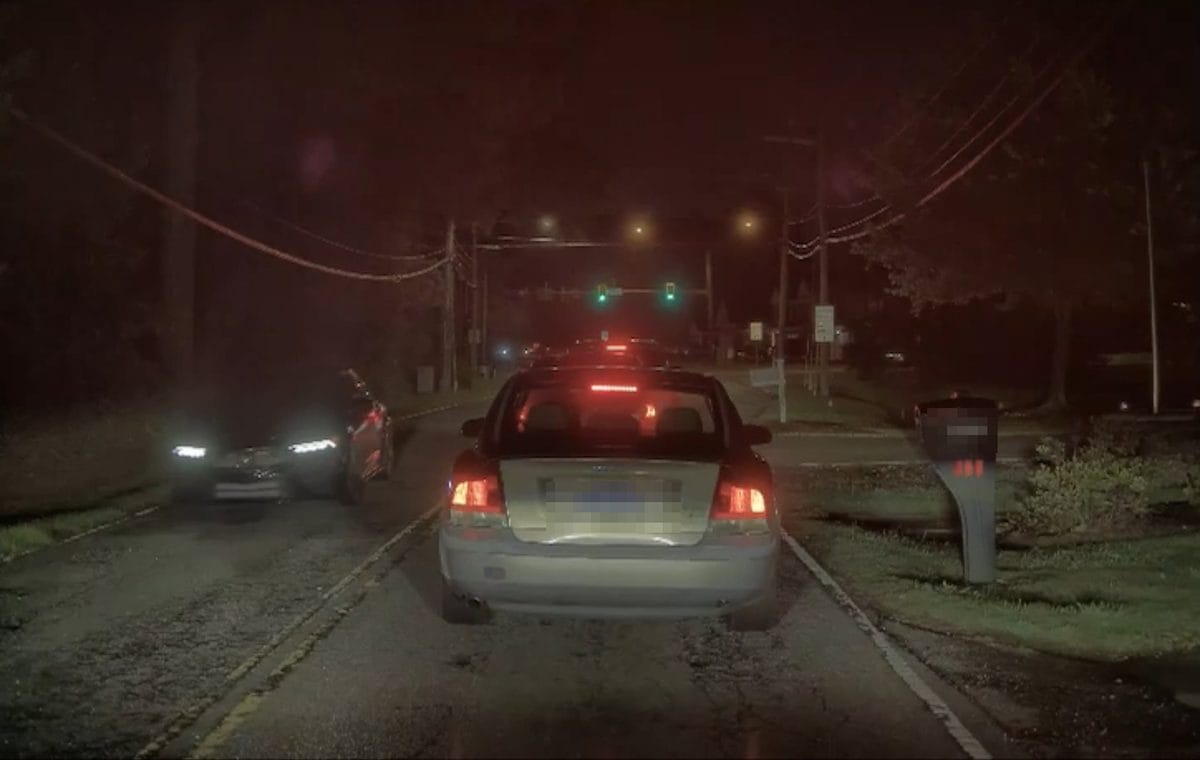
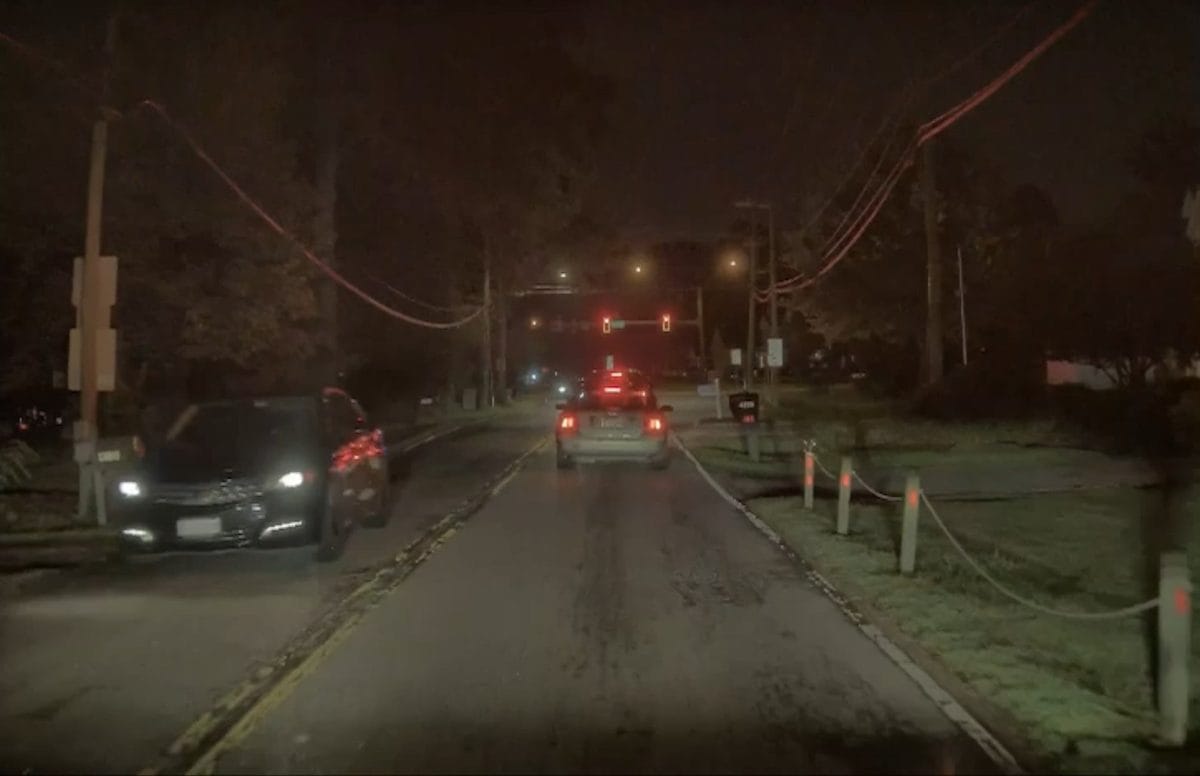
On the night of August 21, 2026, I pulled three stills off the 2023 Model Y’s cameras — regular night driving, Self-Driving engaged, nothing staged. I wanted to know one specific thing: can this footage read a license plate?
Stopped, close range: yes, easily. Sitting behind a sedan at a light, the car’s rear plate is fully legible in the frame. If someone rear-ends you at a stop, or you’re stopped behind the car that caused a wreck, you have what you need.
Oncoming at 14 MPH: no. An approaching car’s front plate is completely washed out by its own headlight bloom. The car is clearly identifiable by make, color, and shape, but the plate is a white smear, and that was at 14 MPH in a parking lot situation.
Highway at 61 MPH: no. The adjacent SUV in the rear camera is identifiable as a vehicle. The plate is not readable at all.
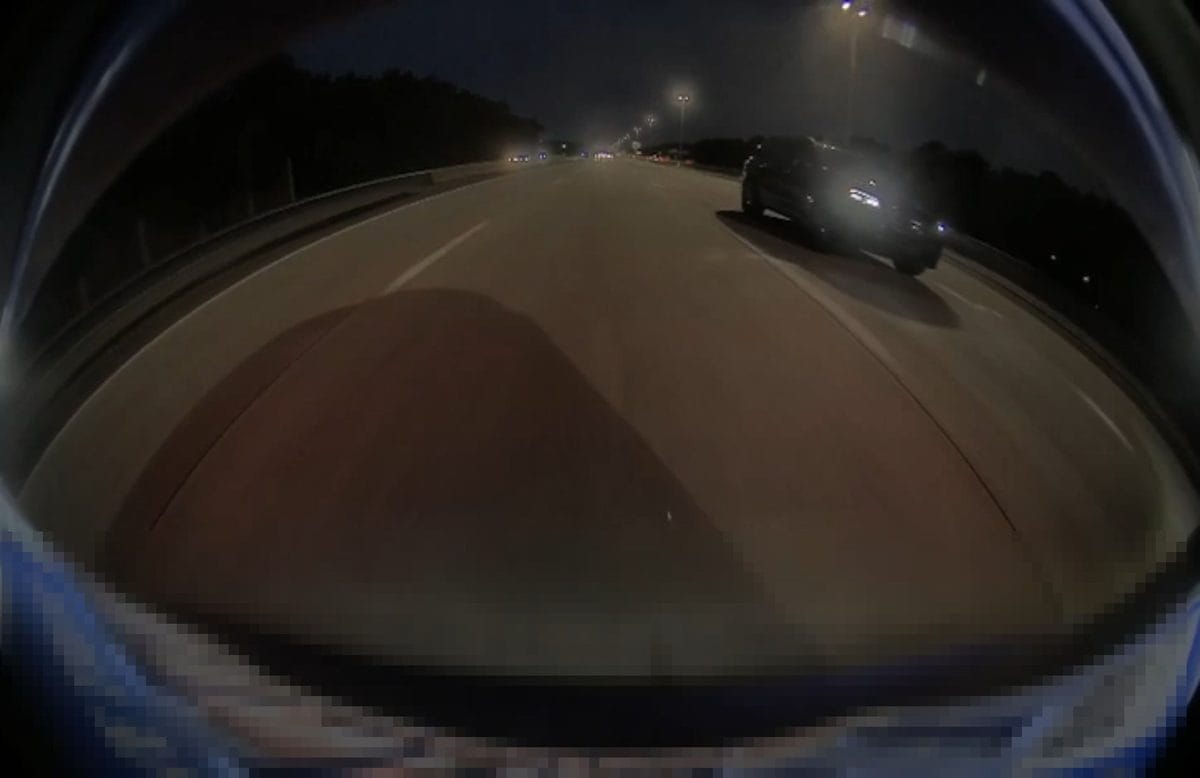
So TeslaCam is good evidence for what happened and weaker evidence for who did it, unless the other car was directly in front of you and barely moving.
A modern dash cam with a Sony STARVIS 2 sensor and HDR on each channel is designed for those two failure cases, headlight bloom and motion blur at speed. That is the whole argument for adding one. TeslaCam has two known weak spots, and the aftermarket cameras are built to cover those two.
What I am not claiming. I don’t own an aftermarket dash cam, so I have not shot the same three scenes with one and compared them side by side. Everything below about the aftermarket cameras comes from manufacturer specifications and live listings, clearly labeled as such — not from my own testing. If I buy one, I’ll update this article with real comparison frames rather than write a new one.
The best dash cam for EV drivers in 2026
Two picks cover almost everyone, and both are VIOFO. Both use STARVIS 2 sensors with HDR on each channel, which is what matters for night plates.
VIOFO A329S 4K 60FPS Dash Cam (Front + Rear)
Best for: the EV owner who wants plate reads at speed and doesn’t want to buy twice.
4K at 60fps up front and 2K at the rear, on dual Sony STARVIS 2 sensors — the IMX678 in front, IMX675 behind. Sixty frames a second is the spec that matters for the failure case I hit: at highway speed, more frames means less smear per frame, and a plate has a chance of landing readable. Two-channel HDR does the same job against headlight bloom.
It also runs Wi-Fi 6 for fast offload (VIOFO rates the 5GHz band up to 30MB/s), takes microSD up to 512GB or an external SSD up to 4TB. VIOFO’s listing specifically calls out an “ultra-low-power parking mode to prevent battery drain,” and the A329S manual is explicit that parking mode only works when the hardwire kit is used.
Note: parking mode requires the hardwire kit below — it is not in the box.
VIOFO A229 Plus Dash Cam (Front + Rear, 2K + 2K)
Best for: most people, honestly — including anyone adding a camera to a Tesla purely as backup.
2K front and 2K rear on dual Sony STARVIS 2 IMX675 sensors, with HDR on both channels. It gives up the A329S’s 4K/60 front channel and Wi-Fi 6, and keeps the things that actually drive night performance: STARVIS 2, F1.8 glass, HDR on every channel, built-in GPS, and a supercapacitor instead of a battery.
Parking mode covers auto event detection with buffering (VIOFO saves 15 seconds before and 30 seconds after a detected event), time-lapse, and low-bitrate continuous. Same caveat: the hardwire kit is sold separately and is required for any of it.
⚠️ Buy the right one. VIOFO sells a 3-channel A229 Plus with an interior camera under a different listing. If you want front + rear only, use the link below — the 3-channel version is a different product at a different price.
If you drive rideshare or want the cabin covered too, the three-channel route is the Vantrue N4 Pro S (4K, triple STARVIS 2) or VIOFO’s own A329S 3CH. And if you want cloud alerts pushed to your phone the way Sentry Mode does, that’s BlackVue’s Elite 9.
Powering a dash cam in an EV is the hard part
This is where EV owners get into trouble, and most dash cam roundups just say “hardwire it” and move on.
A dash cam only records while parked if it has power while parked. In a gas car, that means tapping a fuse in the fuse box. In an EV, and especially in a Tesla, three things change:
1. Tesla explicitly tells you not to. From the Model 3 owner’s manual: “Tesla recommends that you do not plug any non-Tesla accessories, including power inverters, into the low voltage power outlet.” And from the parts and accessories section: “Any damage caused by using or installing non-approved parts, or by performing non-approved modifications, is not covered by the warranty.” That is not a reason never to do it, since plenty of owners hardwire cameras without issue, but you should go in knowing the warranty language exists rather than finding out later.
2. EV 12V systems behave differently. An EV’s 12V battery is small and is topped up from the high-voltage pack on the car’s own schedule, not by an alternator that runs whenever the engine does. Set a parking-mode cutoff too low and you can find yourself with a 12V that won’t wake the car. (If your 12V is already an unknown quantity, that’s its own subject — I’ve written about how the pack and the 12V age differently.)
3. Some standard install shortcuts don’t exist on a Tesla. BlackVue’s own OBD-II power cable page carries a warning that it’s “Not compatible with non-standard OBD II ports found in some Tesla Models.” The easy plug-and-play route isn’t available.
That leaves two reasonable ways to do this.
VIOFO HK6 Type-C Hardwire Kit
Best for: anyone hardwiring a VIOFO into a 12V system and wanting a real safety net.
The HK6 is what turns parking mode on, and it’s the piece people forget to budget for. It carries four selectable low-voltage cutoff points set by a physical slide switch on the box, and only cuts power after the voltage has stayed below your threshold for about 90 seconds — so a momentary dip doesn’t kill your recording. It also broadcasts the measured battery voltage to the camera over Bluetooth, so the number is on the camera screen instead of being a guess.
The cheaper HK4 kit also has voltage cutoff plus a timer and costs less. The HK6’s real advantage is that VIOFO’s hybrid parking mode can switch based on actual measured voltage rather than a fixed timer — on an EV, where charge state is less predictable, that’s the version I’d want.
Fitment: VIOFO A329 series, A229 series, A119 Mini 2. 12V and 24V systems.
70mai Dash Cam Battery Pack (BL96NNX, 96Wh LiFePO4)
Best for: EV owners who’d rather not put a continuous parked load on the car’s 12V at all.
This is the option I think gets under-recommended for EVs specifically. Instead of drawing from the car while it sleeps, the camera runs off a dedicated 96Wh LiFePO4 pack that charges while you drive and then powers the camera on its own. 70mai rates it at roughly 30 hours of parking surveillance on a typical 3W dash cam, with a full hardwired charge in about 60 minutes, and it delays charging ~20 seconds after ignition so it isn’t pulling current during startup.
LiFePO4 also matters here: it’s the chemistry that tolerates heat and cycling best, and 70mai rates these cells at 70% capacity after 2,000+ cycles. The XT30 output simulates standard VCC/ACC/GND signals, so it works with most cameras, not just 70mai’s.
It’s not cheap, and it’s a box you have to find a home for. But it sidesteps the entire “did I just kill my 12V” question, which on an EV is worth something.
Don’t cheap out on the card
Whatever camera you buy, the memory card is the part most likely to fail, and it usually fails without telling you. A dash cam writes to the card continuously the whole time the car is on, which is a far heavier workload than a card in a phone or camera ever sees.
This happened to me. My Model 3 was sideswiped while parked with Sentry armed, and there was no footage at all, because the drive in the port had thrown a “storage media too slow” error I never noticed. The whole story is in Tesla USB Drive Keeps Failing?, along with what I replaced it with.
SanDisk 128GB High Endurance microSDXC
Best for: every dash cam on this page, and Tesla’s own USB drive setup too.
Purpose-built for continuous write cycles rather than for holding photos. It’s the card in my own Model 3’s glovebox reader right now, the one that finally solved the problem after the cheap thumb drive quit, and 128GB is plenty for a loop recorder. If you want more room, the PNY PRO Elite High Endurance 256GB is the same class of card at double the capacity.
For the Tesla side of storage, meaning which drives hold up in the glovebox port, see our Tesla Sentry Mode and Dashcam storage guide.
Comparison table
| Product | Standout trait | Best for | Tier |
|---|---|---|---|
| VIOFO A329S 2CH | 4K/60fps front, Wi-Fi 6, ultra-low-power parking mode | Plate reads at speed; buy-once | Premium |
| VIOFO A229 Plus 2CH | 2K+2K dual STARVIS 2, HDR both channels | Most drivers; Tesla backup camera | Mid |
| VIOFO HK6 hardwire kit | 4 switch-set cutoff points + Bluetooth voltage readout | Anyone enabling parking mode | Accessory |
| 70mai BL96NNX battery pack | 96Wh LiFePO4, ~30h parking, isolates from car 12V | EV owners avoiding a parked 12V load | Premium accessory |
| SanDisk 128GB High Endurance | Built for nonstop write cycles | Every camera here | Budget |
Frequently Asked Questions
Do I even need a dash cam if I drive a Tesla?
For most owners, no. Sentry Mode and Dashcam cover the common cases and cost nothing extra. Add one if you regularly park somewhere with a real risk profile, if you need front-plate reads at speed, or if you want a system that isn’t subject to Tesla’s own caveat that it may not record every safety-critical event. If you drive a non-Tesla EV, a dash cam is your only camera, not a supplement.
Will a dash cam drain my EV’s 12V battery?
It can, if you enable parking mode without a proper cutoff. That’s exactly what the hardwire kit’s low-voltage cutoff is for — it stops feeding the camera before the 12V gets too low to wake the car. EV 12V systems are smaller and recharge on the car’s own schedule rather than off an alternator, so set the cutoff conservatively. The zero-risk version is a dedicated battery pack that never touches the car’s 12V for parked recording at all.
Does TeslaCam record audio?
Tesla’s owner’s manual doesn’t address audio for saved Dashcam or Sentry clips one way or the other. The only audio statement in the manual applies to the live camera feed in the mobile app (“No audio is captured”), which is a different feature. Owners widely report that saved clips are video-only — treat that as owner consensus rather than a documented Tesla spec. Aftermarket cameras generally do record audio, with a setting to turn it off.
Can I just plug a dash cam into the 12V accessory socket?
Physically, yes — but Tesla’s manual specifically recommends against plugging non-Tesla accessories into the low voltage power outlet, and the manual says the outlet is powered only while the car is in use or detects someone present (there is a Keep Accessory Power On setting, but it is not available in Low Power Mode), so you generally won’t get parked recording that way. If you only want driving-hours recording and don’t care about parked coverage, the included cigarette-lighter adapter is the simplest install. For parked recording you need either a hardwire kit or a battery pack.
Is 4K worth it over 2K on a dash cam?
Mostly for one thing: reading plates on moving vehicles. In good light, 2K with a STARVIS 2 sensor and HDR is plenty. The gap opens up at night, at speed, and at distance — which happens to be exactly where my own TeslaCam footage fell down. If the reason you’re buying is “TeslaCam couldn’t read the plate,” pay for the 4K/60 front channel. If it’s “I want a backup recording of my commute,” 2K is fine and you’ll spend the difference better elsewhere.
Our Honest Verdict
The short version, by situation:
If you drive a Tesla and park in normal places: you probably don’t need this. Turn Sentry Mode on (it’s off by default), put a decent high-endurance drive in the glovebox port, and check occasionally that it’s actually recording. That covers most of what a second camera would do, for the price of a memory card.
If you drive a Tesla and want the two things TeslaCam is weak at, plate legibility against headlight glare and at highway speed, then the VIOFO A329S 2CH plus the HK6 hardwire kit is the setup that targets those specific failures. Budget for the kit; it isn’t optional and it isn’t included.
If you drive a non-Tesla EV: you have no built-in system, so this is a straight purchase, and the A229 Plus 2CH gives you nearly everything the A329S does for meaningfully less. Spend the savings on the power side.
And whatever you buy, decide how you’re powering it before you order it. A lot of EV owners buy the camera first, then find out parking mode needs a separate kit and that their car’s install path isn’t the standard one. Sort that out first.
My own answer: I’m not installing one. The built-in system is enough for how I park, and if that changes, this article gets real side-by-side frames.